DracoAi
A downloadable tool for Windows
DracoAI Toolkit — Portable AI Services Manager for Windows
One folder. A dozen local AI services. Zero registry writes.
DracoAI Toolkit is a self-contained Windows launcher that installs, runs, and manages a stack of popular local AI services from a single portable directory. No installers, no admin rights, no system PATH changes, no scattered Python environments fighting each other across your machine. Move the folder between drives or machines and everything keeps working.
It's built for tinkerers, home-lab users, and AI enthusiasts who want to run image generation, large language models, text-to-speech, and translation locally — without spending the weekend untangling CUDA versions and broken venv activations.
Runs without administrator rights
DracoAI Toolkit is designed to run from a standard user account. No UAC prompts, no elevation requests, no Windows services installed, no registry edits, no scheduled tasks. It works on locked-down corporate workstations, from a USB SSD, or anywhere else you have ordinary write access. The toolkit lives entirely inside its own folder and makes no permanent changes to your system — deleting the folder removes it cleanly.
The single exception is Visual Studio Build Tools (optional, used only by a small number of services that compile native Python extensions), which Windows itself requires admin to install. Skipping it disables only those few services; everything else installs and runs without elevation.
Who it's for
- Content creators running local SDXL / Flux image and video generation
- Roleplay and storytelling users running SillyTavern with local LLM backends
- Privacy-focused users who want capable local AI without sending prompts to a cloud service
- Researchers and hobbyists comparing models across multiple frameworks
- Home lab operators who like clean installs that leave no system footprint
- Anyone tired of spending more time fixing Python environments than actually using the models
What you get
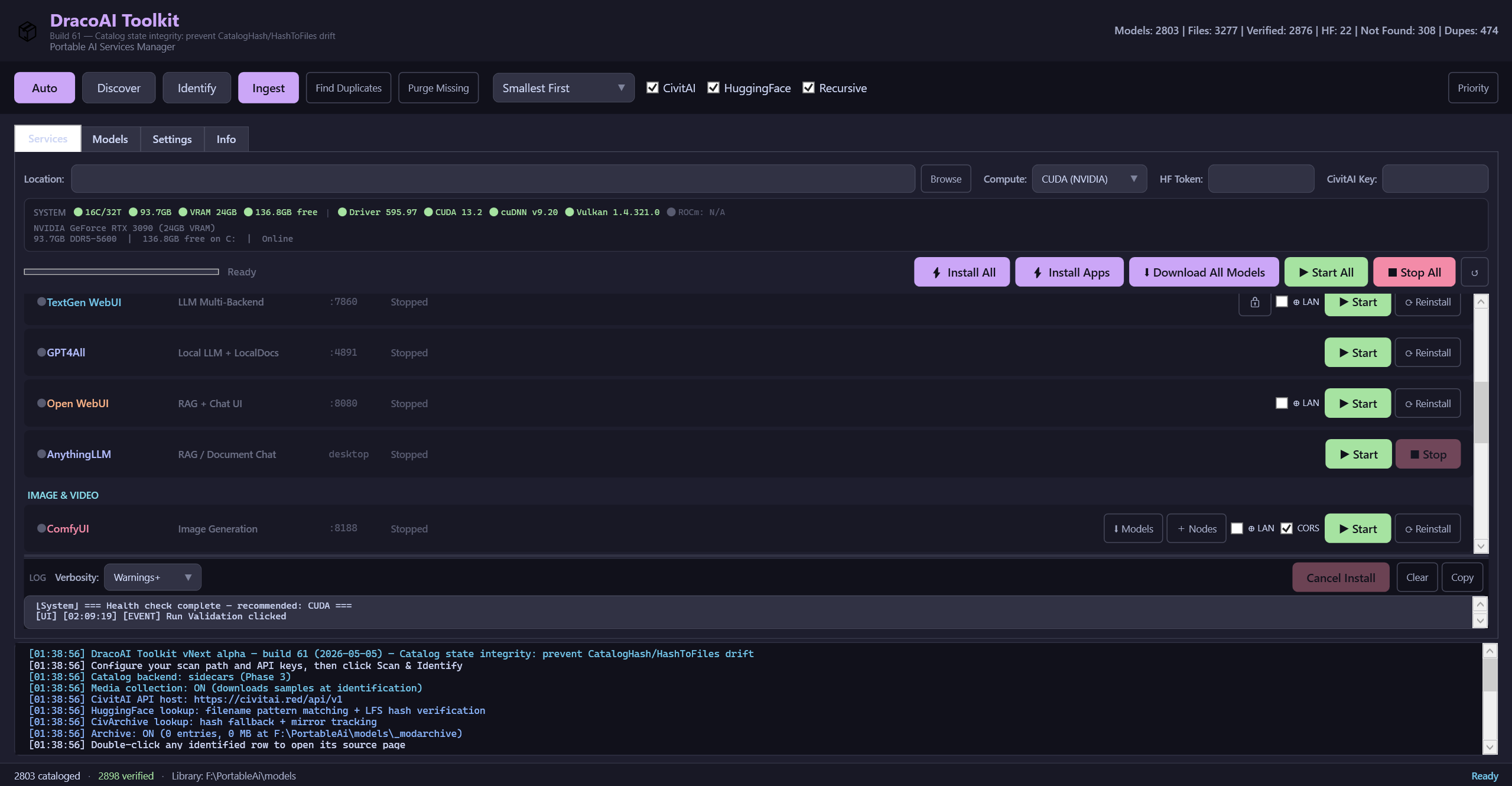
- Unified launcher. A single window controls every installed service. Start, stop, and monitor status with live port checks and one-click access to each service's web UI.
- One-click installs. Pick the services you want from the Services tab; DracoAI Toolkit handles the clones, the dependency installs, the Python virtual environments, and the per-service configuration.
- Bundled toolchain. Python (embeddable 3.10 and 3.11), Node.js, Git, ffmpeg, and other common dependencies ship inside the toolkit directory — nothing relies on what's installed system-wide.
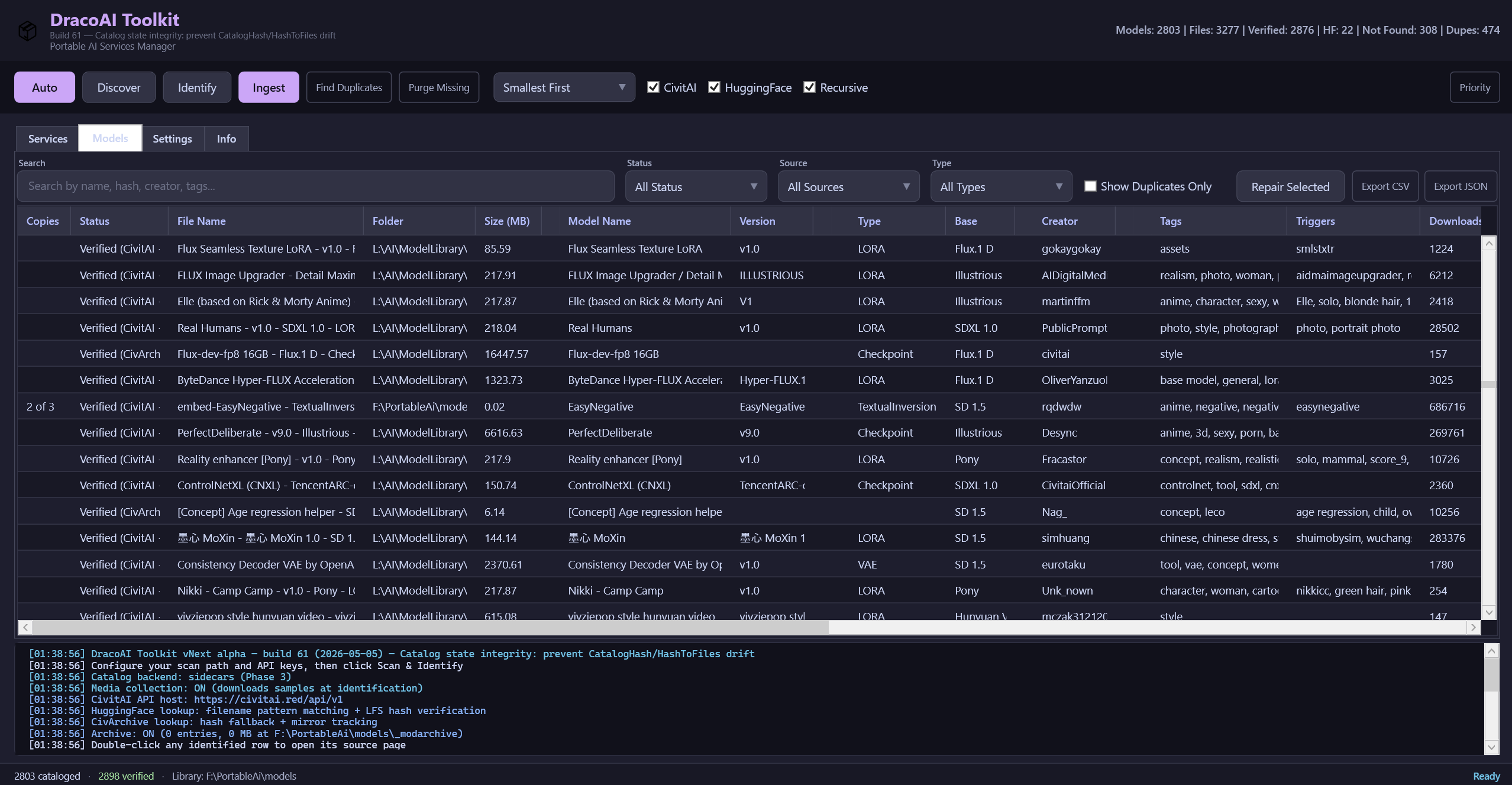
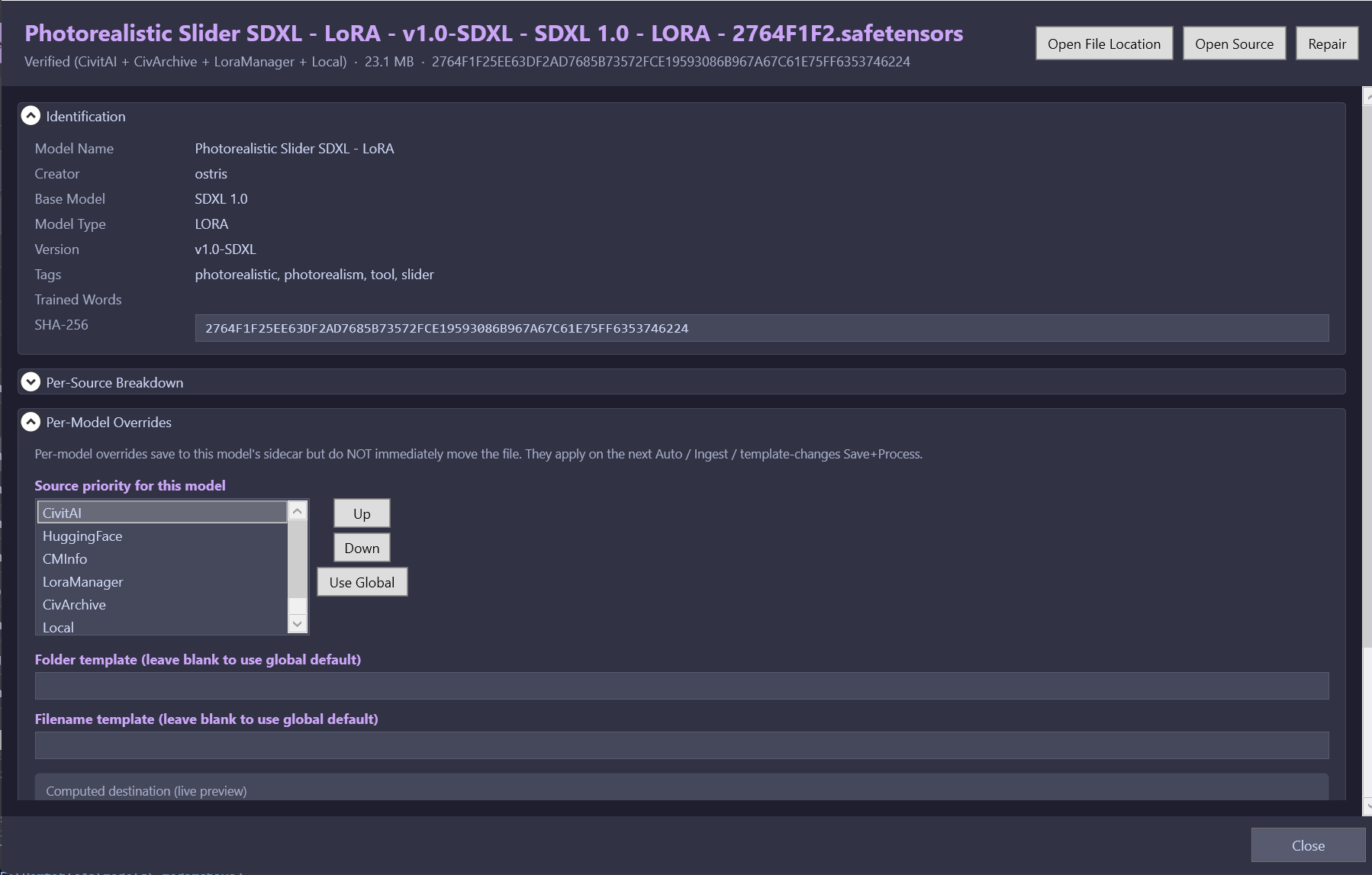
- Built-in model catalog. SHA-256 hash matching against CivitAI, HuggingFace, and CivArchive identifies and attributes every checkpoint, LoRA, embedding, and VAE in your collection. Duplicates collapse to a single record with multiple locations.
- Shared model storage. NTFS junctions automatically link each service's
models/folder to a central store — no more keeping five copies of the same 6 GB checkpoint across five different services. - Standalone start scripts. Every service gets its own
Start-<ServiceName>.batauto-generated on install, so you can launch ComfyUI or SillyTavern without opening the Toolkit if you prefer. - System health detection. On startup the launcher inspects your GPU, VRAM, CUDA / cuDNN / Vulkan / ROCm presence, and driver health so you know what's available before you try to install anything.
- Persistent state. Service selections, model preferences, and API tokens (HuggingFace, CivitAI) survive between launches.
- Detailed session logs. Every install, service start, and update is written to a timestamped log file in the toolkit's
logs/directory so you have a record when something goes sideways.
Supported AI services
Image & Video Generation
- Stable Diffusion Forge — fast, memory-efficient SD / SDXL / Flux UI based on the AUTOMATIC1111 codebase
- ComfyUI — node-based pipeline editor for advanced image and video workflows
- Wan2GP — video generation accessible on consumer GPUs
- LivePortrait — image-driven portrait animation
- Upscayl — AI image upscaling
LLM Backends
- Ollama — lightweight LLM server for running local models with simple commands
- KoboldCpp — GGUF-based inference engine with broad model format support
- Text Generation WebUI — the classic multi-backend LLM playground
- Tabby — high-performance inference server
- GPT4All — desktop LLM runner with a built-in model browser
LLM Frontends
- SillyTavern — conversational LLM frontend with deep character and persona support
- Open WebUI — polished chat interface compatible with Ollama and other backends
- Agnai — multi-user character chat with optional self-hosting
Audio & Translation
- AllTalk TTS — local text-to-speech with optional RVC voice conversion
- LibreTranslate — local machine translation across dozens of language pairs
Portability by design
DracoAI Toolkit makes no permanent changes to your system. There are no registry writes, no system PATH modifications, no Windows services installed, no scheduled tasks created, and nothing left behind if you delete the folder. Every dependency lives inside the toolkit directory. You can move the install root between drives or machines and everything continues to work without a reinstall.
The launcher is a single Windows executable with no external script dependencies at runtime. The interface is built with WPF in a Catppuccin Mocha theme.
System requirements
- OS: Windows 10 (build 19044 or later) or Windows 11
- RAM: 16 GB minimum; 32 GB or more recommended for image generation and larger LLMs
- GPU: NVIDIA RTX 20-series or newer with 8 GB+ VRAM recommended for image and video generation. CPU-only LLM inference works on any modern machine; AMD ROCm support varies by service.
- Disk: 50 GB free for a baseline install; significantly more if you plan to store a serious model library (individual SDXL checkpoints can be 6 GB each, large LLMs 20-70 GB).
- Permissions: Standard user account is sufficient. See Runs without administrator rights above for details.
- Network: Internet connection required for first-time service installs and model downloads. Everything runs fully offline after that.
Roadmap
DracoAI Toolkit is under active solo development. On the near-term list:
- Expanded model catalog with filtering, tagging, and side-by-side comparisons
- Smarter VRAM-aware service launching (warn before launching a service that won't fit)
- One-click toolchain updates for embedded Python, Node, and Git
- Proper secrets handling via Windows Credential Manager
- Additional services as they're tested and integrated
The roadmap is shaped heavily by user feedback — if there's something you want, leave a comment.
⚠ Early Access
DracoAI Toolkit is an early-access, work-in-progress release.
Functionality is incomplete and may change without notice. Bugs, crashes, data loss, and unexpected behavior are possible. Features may appear, disappear, or behave differently between versions. This is a personal project — it is not professionally tested, supported, certified, or affiliated with any organization.
DracoAI Toolkit installs and manages third-party AI software and model weights. You are solely responsible for reviewing and complying with the licenses, terms of service, and applicable laws governing any third-party software or content you use through it.
This software is provided "AS IS", without warranty of any kind. Use at your own risk.
Feedback & bug reports
DracoAI Toolkit started as a solo project to fix years of personal frustration with tangled local AI installs. If you hit a bug, run into a workflow problem, or have a feature suggestion, please leave a comment on this page — every report shapes the next version.
Purchase
In order to download this tool you must purchase it at or above the minimum price of $10 USD. You will get access to the following files:
Leave a comment
Log in with itch.io to leave a comment.